On building a Persistent Queue in Rust
Lessons on File I/O and Scheduling
rust systems-programming message-queues linux file-io
Introduction
Sending a single message across systems is trivial. But production systems generate millions of logs and metrics every second, and losing them isn’t an option. That’s where persistent queues come in: they ensure durability even in case of failure while handling high volume of data flowing through the system.
Recently, I had the opportunity to work on an implementation in OpenObserve. The design seemed straightforward:
- Write incoming data to disk immediately.
- Export it asynchronously to a remote destination.
Making this performant and reliable was the real challenge. Some problems I faced along the way included:
- Hitting the maximum limit of open file descriptors (OpenFDs) on the system.
- Poor reader task management, which resulted in disk usage piling up.
- Data corruption caused by incorrect file handling.
As I was tackling them, I learned a lot about Linux file I/O and task scheduling. In this post, I’ll share the architecture and the lessons I learned.
---
First, what is a Persistent Queue?
A persistent queue is a system that persists all messages to disk upon receipt and providing FIFO guarantees while ensuring no data loss even in case of crashes.
Tools like Kafka and Vector use similar designs. My implementation was simpler, but the core principles were identical.
---
The Architecture
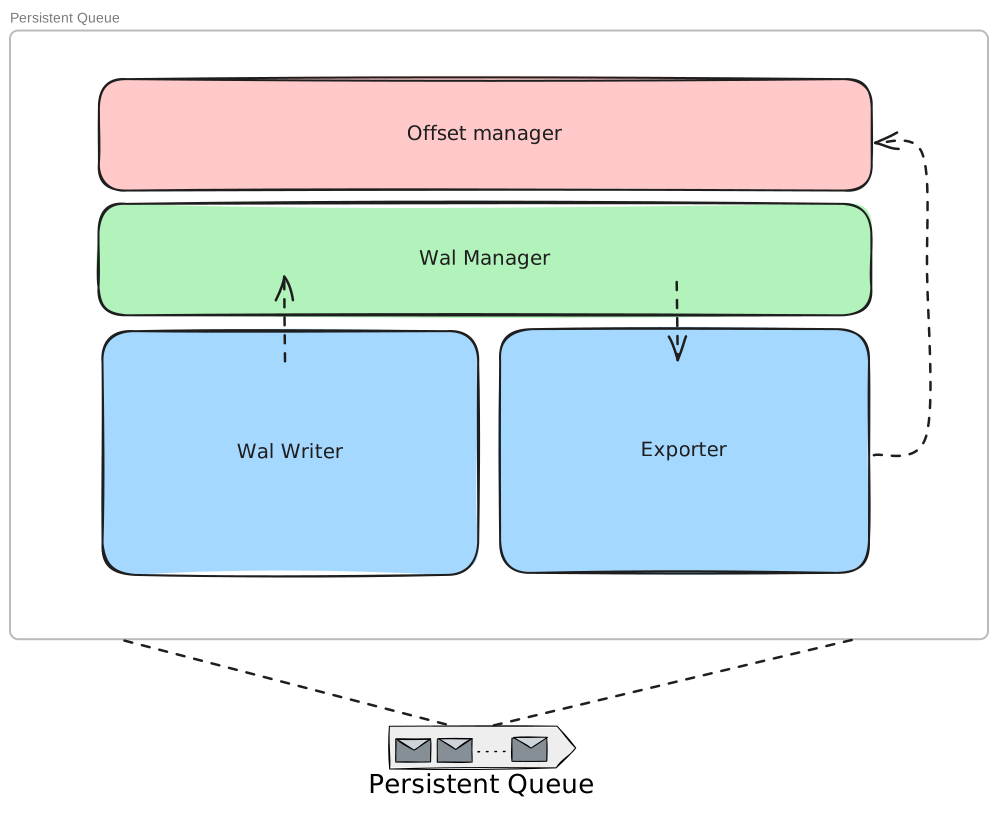
Four core components:
- WAL Writer: Writes data to disk (Write Ahead Log) using multiple writers
- Offset Manager: Tracks read/export progress, persists offsets to disk to prevent duplicates
- Exporter: Reader pool that forwards persisted data to remote systems
- WAL Manager: Global state managing file lifecycle and scheduling export tasks
This architecture supports multiple data streams, each with their own WAL files and state. Once data is ingested, it stays safe until delivered.
Where is the in memory queue?
Now, there is no consensus on what a persistent queue architecture should look like. You can also call this architecture persistent wal if you like. But having an in memory queue will not drastically change the functionality of the system. Moreover, there are some reasons not to do so:
- Complicates the architecture: Now one has to handle spilling to disk when queue is full, alter the reader to read from WAL after boot up.
- Duplicates the data: The cost of serializing the data to disk and while still keeping it in memory results in duplication. The only source of truth is the WAL in any scenario.
- Minor performance boost: Modern SSDs provide good RW speeds, but if we are using HDDs there might be a case for having in memory queue. but that too will largely lose its edge to OS file buffer caches as most iops will happen from/to OS buffers.
WAL Life cycle
The WAL lifecycle enables readers and writers to work on single WAL file simultaneously:
- File Rotation: Writers use a single WAL until hitting ~100 MB or X seconds time threshold. This prevents files from growing too large or staying open indefinitely.
- Concurrent Access: Readers operate simultaneously without contention. Each batch read (~10 MB) opens a new file descriptor to see the latest data.
- Offset Coordination: Readers stay behind writers but can catch up to EOF. At this point both are at the same position: writer appends, reader waits.
- File Cleanup: Writers rotate to new files, marking old ones for deletion. Files delete only after readers finish and update the Offset Manager.
- Crash Recovery: Offset Manager persists positions after each export. Restarts resume from last saved position, preventing data loss with minimal duplicates.
---
Challenges I Faced
Three key engineering challenges emerged:
1. Efficient File I/O: Improving disk read/write speeds
2. Task Scheduling: Avoiding busy-waiting on slow data streams
3. Managing OpenFDs: Preventing file descriptor exhaustion
---
Insights & Learnings
1. Batching Writes and Reads for Performance
Writing each message individually with fsync was stacking syscalls and increasing the kernel time of application. Batching writes and periodic flushes improved performance significantly.
Using fdatasync instead of fsync was crucial: it skips metadata syncing when unnecessary. From man fsync:
> fdatasync() reduces disk activity for applications that do not require all metadata to be synchronized with the disk.
Rust provides a clean API for this:
fn write_batch(writer: &mut File, batch: &[Vec<u8>]) -> std::io::Result<()> {
    for record in batch {
        writer.write_all(record)?;
    }
    writer.sync_data()?; // fdatasync once per batch
    Ok(())
}
But this introduced a trade-off: losing a batch on crash. Production systems like Kafka and PostgreSQL expose similar trade-offs through configuration. Smaller batches reduce risk but hurt performance.
Reader improvements were equally impactful. Instead of opening file descriptors per entry, readers now fill entire buffers, dramatically improving export performance and update the Offset Manager less frequently, reducing contention.
All together, these changes reduced syscall overhead, reduced lock contention and improved throughput without sacrificing too much durability.
---
2. Scheduling Tasks Intelligently
Initially, exporters competed with writers, creating stalls. Readers would busy-wait polling for new data. This was problematic for slow streams, as they'd hog reader tasks from the pool until file rotation.
enum WalState {
    ReadComplete,
    Rotated,
    NextReadAt(tokio::time::Instant)
}
The solution was storing WAL state in a global in-memory cache to better coordinate task scheduling. I used RwLock since readers accessed this cache far more frequently than writers.
A few key insights emerged:
- Readers hitting EOF would starve for work, so I added a simple rescheduling mechanism: wait X seconds then try again. This freed up reader slots for other files and kept the CPU busy.
- Some files get corrupted or can't export due to network issues. Rather than letting them stall everything, I implemented exponential retry to deprioritize problematic files. Files that exceed the retry duration eventually get deleted, keeping the system resilient.
Side note: Rather than rescheduling, one can also couple the reader and writer much closer by having the writer send a signal every time it has pushed new data. This would make the system more responsive to incoming data and avoid lags. However, I chose to keep the coupling limited to writer close as I reckoned a drastic increase in lock contention with such frequent cache updates.
Hence, storing a state in a memory cache allowed components to work better together and provide better performance by utilizing each CPU cycle to the max.
---
3. Reducing OpenFDs
While systems have soft and hard limits for open file descriptors, it's wise to be conservative. Caching file descriptors in memory often leads to production issues since applications rarely monitor their FD usage.
By opening file descriptors only when needed, we avoided the dreaded Too many open files error. You can read more about this common pitfall here.
---
Performance Impact Breakdown
Production Results: 15 MB/s → 150+ MB/s (10x improvement)
| Optimization | Before | After | Impact | Key Changes |
|--------------|--------|--------|---------|-------------|
| Task Scheduling | 15 MB/s | 30 MB/s | 2x | Eliminated busy-waiting, reduced lock contention |
| Batching I/O | 30 MB/s | 150+ MB/s | 5x | 10MB batches, fdatasync, buffer reads |
| FD Management | - | - | Reliability | Prevented "Too many open files" errors |
The compound effect delivered the 10x overall improvement measured in production
Note that the plus signifies that the architecture can handle even higher load, but the max is not known
---
Reflections
What struck me most was how something as simple as a queue isn’t simple at all.
Every design choice (batching, scheduling, having a global state) had deep trade-offs.
This experience gave me a new appreciation for tools like Kafka and Vector. Even a minimal persistent queue required careful thought about data safety and performance.
---
Closing Thoughts
Building this was both humbling and rewarding. I got some great advice and insights from my colleagues along the way, gaining experience especially around File I/O and scheduling, ultimately strengthening my systems instincts.
If you’ve worked on similar systems, I’d love to hear how you approached these challenges.
---